
When people think about cybersecurity, they usually think about firewalls, cloud security, endpoint protection, MFA, and access controls.
But there is another layer that often gets overlooked: the physical infrastructure behind the network.
Your MDF and IDF rooms house the backbone of your business network. These rooms support the switches, patch panels, fiber connections, and cabling that keep people, systems, devices, and applications connected.
When that physical layer is messy, unsecured, or poorly documented, it can create real risk.
A disorganized IT closet is not just a maintenance problem. It can affect cybersecurity, uptime, compliance, troubleshooting, and overall network reliability.
The Problem With a Messy IT Closet
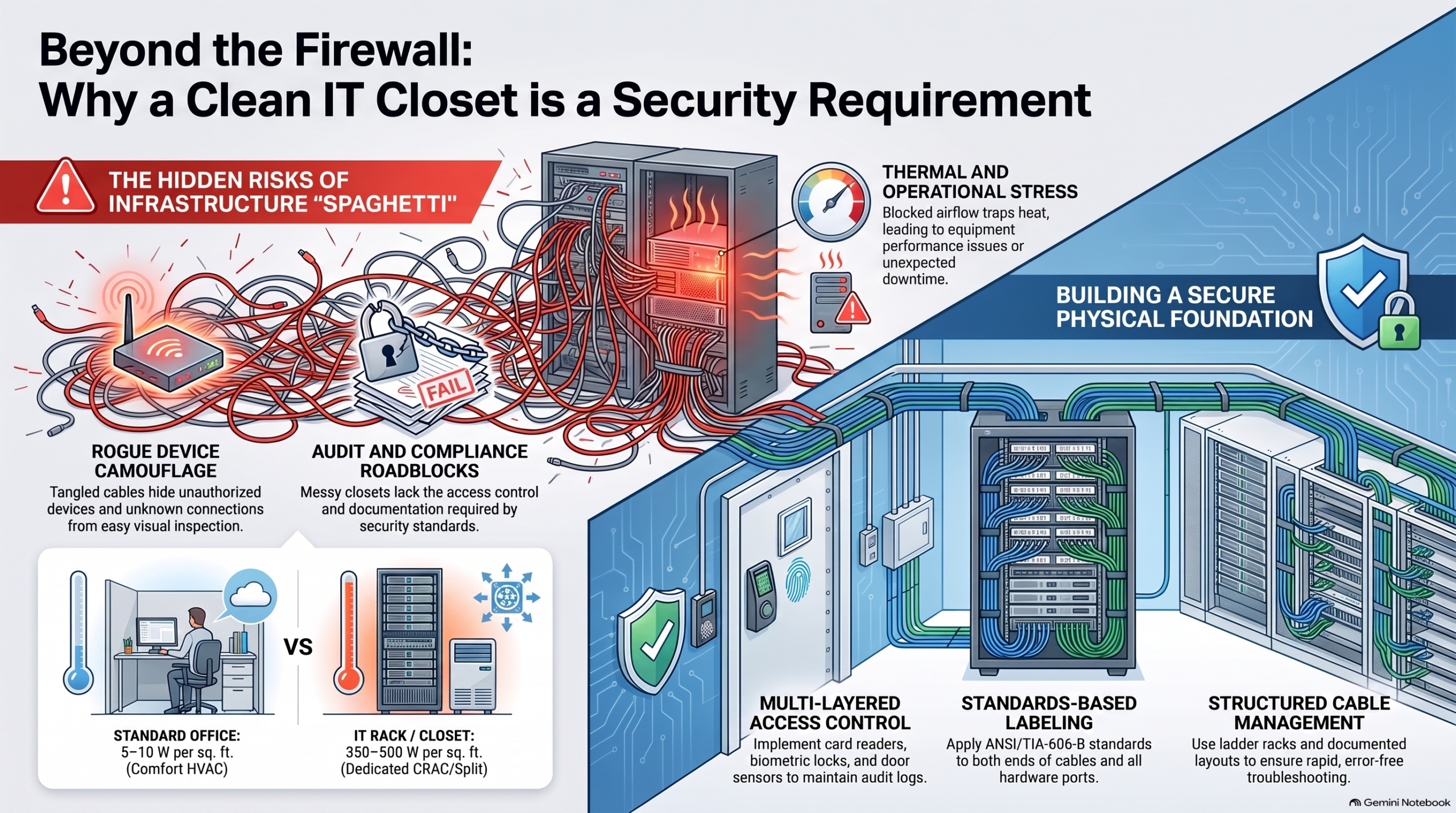
A tangled closet full of unlabeled cables makes it harder to understand what is connected, where it goes, and whether something looks out of place.
That matters because security is not only digital. It is also physical.
If someone plugs in an unauthorized device, adds an unknown cable, or connects equipment to an active switch port, your team needs to be able to spot it quickly.
In a clean and organized rack, an unexpected connection is easier to notice. In a messy closet, it can blend into the clutter.
That is where clean cabling, proper labeling, and clear documentation become part of a stronger security plan.
Clean Cabling Helps Reduce Security Blind Spots
A strong network starts with knowing what is connected.
When cables are labeled, mapped, and organized, your IT team can quickly trace connections back to the right port, patch panel, room, or device.
That helps with:
• Identifying unauthorized devices
• Locating suspicious connections
• Verifying active ports
• Supporting faster investigations
• Keeping better control of the physical network
Without that visibility, even a small issue can take much longer to investigate.
Clean cabling makes the physical network easier to inspect, manage, and secure.
Labeling and Documentation Matter
A good cabling system should not rely on guesswork.
Every cable should be labeled on both ends. Patch panels, switch ports, racks, and rooms should follow a clear naming system. The goal is simple: anyone who is authorized to work in the closet should be able to understand the layout without having to trace every cable by hand.
Good documentation helps teams answer important questions quickly:
• Where does this cable go?
• What device is connected to this port?
• Is this connection approved?
• Is this port still in use?
• What changed since the last service visit?
This is especially important when troubleshooting outages, performing upgrades, or preparing for audits.
Messy Cabling Can Cause Downtime
Not every network problem comes from a cyberattack. Sometimes downtime happens because someone accidentally unplugs the wrong cable.
In a crowded and tangled rack, even a simple patching change can become risky. A technician may have to pull, move, or separate multiple cables just to follow one connection. That increases the chance of disconnecting the wrong line, damaging a cable, or disrupting a critical system.
Organized cabling reduces that risk.
It also makes everyday work faster and safer, including:
• Troubleshooting
• Replacing equipment
• Adding new connections
• Moving users or devices
• Upgrading switches or patch panels
• Cleaning up old unused cables
A clean rack saves time when everything is working and becomes even more valuable when something goes wrong.
Cable Damage Can Affect Performance
Cables need to be handled properly. Tight bends, heavy bundles, poor routing, and too much pulling can damage copper and fiber connections.
That damage is not always obvious. Sometimes the result is not a complete outage, but slower performance, packet loss, weak connections, or intermittent issues that are hard to diagnose.
Common problems include:
• Cables bent too tightly
• Fiber runs pressed under heavy cable bundles
• Zip ties pulled too tight
• Copper cables stretched during installation
• Poor routing through crowded pathways
• Cables crushed behind racks or cabinets
These issues can create network problems that look like software or hardware failures, even though the real cause is physical.
That is why proper cable pathways, cable management, and installation practices matter.
MDF and IDF Rooms Need Physical Security
MDF and IDF rooms should be treated as sensitive areas.
These rooms often contain core switches, fiber backbone connections, routers, access control connections, camera network equipment, and other critical infrastructure.
If someone gains unauthorized access, they may be able to disconnect equipment, plug in a rogue device, tamper with cables, or disrupt network service.
Strong physical security can include:
• Controlled access
• Card readers or electronic locks
• Door sensors
• Video surveillance
• Visitor logs
• Alerts for doors left open
• Limited access for approved personnel only
The goal is to protect the network at the physical level, not just through software controls.
Clean Infrastructure Supports Compliance
Many organizations need to meet security, privacy, or industry compliance requirements.
That often includes protecting physical access to systems, documenting infrastructure, limiting access to sensitive areas, and maintaining clear records.
A messy, unlocked, or undocumented network closet can create problems during an audit.
A better setup includes:
• Locked MDF and IDF rooms
• Labeled cabling
• Organized racks
• Clear documentation
• Access logs
• Camera coverage where appropriate
• Environmental monitoring when needed
Good organization does not just make the room look better. It helps show that the business is taking infrastructure security seriously.
Airflow and Heat Are Also Security Issues
A messy IT closet can also create environmental problems.
When cables block airflow, equipment can overheat. Switches, servers, and network devices need proper ventilation to stay reliable. If heat builds up behind a rack or cabinet, equipment may slow down, fail, or shut down unexpectedly.
Poor cable management can cause:
• Blocked airflow
• Hot spots inside cabinets
• Strain on cooling systems
• Shorter equipment lifespan
• Unexpected downtime
• Higher risk of hardware failure
Keeping cables organized allows air to move properly around the equipment. It also makes it easier to inspect and maintain the room.
The Fix Starts With the Basics
Improving a messy IT closet does not always require a complete rebuild. In many cases, the first step is bringing order to the environment.
A stronger setup should include:
• Labeling both ends of every cable
• Organizing patch panels and switch ports
• Removing abandoned or unused cables
• Separating power and data where appropriate
• Using proper cable managers and pathways
• Documenting rack layouts and connections
• Securing access to MDF and IDF rooms
• Monitoring the space for access and environmental issues
These basics can make a major difference in security, uptime, and day to day support.
How Avisight Can Help
Avisight helps businesses clean up, organize, and improve the physical infrastructure that supports their network.
Our trained technicians can review your MDF and IDF rooms, identify messy or risky cabling, improve labeling, clean up patching, organize racks, and help create a more secure and serviceable environment.
The goal is not just to make the closet look better.
The goal is to make your network easier to manage, easier to protect, and less likely to fail when your business needs it most.
Final Thought
Cybersecurity does not start and end with software.
It also depends on the physical infrastructure behind the scenes.
A clean, labeled, and secure IT closet helps your team troubleshoot faster, reduce risk, support compliance, and protect uptime.
A stronger network starts with a cleaner foundation