
Choosing security cameras, access control, or a video intercom system involves more than selecting equipment. One of the first—and most important—decisions is how the system will be managed.
Should your business choose a cloud-managed platform or keep everything on-premise?
There is no universal answer. Both approaches can provide reliable security when designed and maintained correctly. The better choice depends on your facility, number of locations, internet reliability, storage requirements, budget, internal resources, and plans for future growth.
Understanding the differences can help you choose a system that works not only on installation day, but for years to come.
What Is a Cloud-Managed Security System?
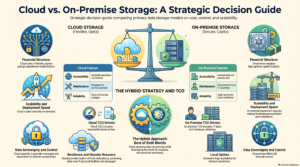
A cloud-managed security system allows authorized users to manage cameras, doors, users, alerts, and other security functions through an online platform.
Depending on the system, video or system data may be stored in the cloud, on the local device, or through a combination of both. Administrators can typically access the platform through a web browser or mobile app without connecting directly to equipment inside the building.
Cloud-managed security is often a strong option for businesses that:
- Operate multiple offices or facilities
- Want to view cameras or manage doors remotely
- Do not have dedicated IT staff at every location
- Prefer automatic software and security updates
- Need a consistent system across several sites
- Are comfortable with ongoing subscription or licensing costs
One of the biggest advantages is centralized management. Instead of maintaining a separate security system at each location, an authorized administrator can often manage multiple sites from one dashboard.
This can make it easier to add or remove users, review activity, respond to alerts, and maintain consistent security policies across the organization.
However, businesses should understand what depends on the internet connection. Some systems continue recording video and controlling doors locally during an outage, while others may lose certain features until connectivity is restored. These details should be confirmed before choosing a platform.
What Is an On-Premise Security System?
An on-premise system uses equipment installed at the business location, such as a network video recorder, server, storage appliance, or local access-control panel.
Video and system data are generally stored and managed onsite. Remote access may still be possible, but it usually requires additional network configuration and ongoing oversight.
On-premise security may be a good fit for organizations that:
- Want direct control over their equipment and data
- Prefer local video storage
- Need longer video-retention periods
- Have limited or unreliable internet service
- Already maintain network racks, server rooms, and IT infrastructure
- Have internal IT staff or a trusted technology partner
- Want to reduce recurring cloud-storage or licensing expenses
Local storage can be especially valuable when a business needs to retain a large amount of video. Depending on the number of cameras, recording quality, frame rate, and retention period, cloud-storage costs may become significant.
The tradeoff is that the business is generally responsible for maintaining the equipment. Hardware failures, storage capacity, software updates, backups, remote-access security, and system health all require attention.
An on-premise system may provide more direct control, but it also places more responsibility on the organization operating it.
What About a Hybrid Security System?
The decision does not always have to be entirely cloud or entirely on-premise.
A hybrid system may combine local recording and operation with cloud-based management, remote access, or backup. For example, cameras may continue recording onsite while authorized users manage the system through a cloud portal.
This approach can provide some of the convenience of cloud management while preserving local functionality and storage. It may be especially useful for businesses with long retention requirements, multiple locations, or concerns about internet outages.
Hybrid systems can also introduce additional complexity, so the design should clearly define which functions are local, which depend on the cloud, and what happens when connectivity is interrupted.
Five Questions to Ask Before Choosing a System
Before comparing brands or requesting proposals, start with these five questions.
1. How long must video be retained?
A business that needs seven days of footage has very different storage requirements from one that needs 30, 60, or 90 days.
Retention calculations should consider the number of cameras, resolution, frame rate, recording schedule, motion activity, and any legal, insurance, or operational requirements.
2. Who needs remote access?
Determine who should be able to view live video, review recordings, manage credentials, unlock doors, or see activity reports.
Access should be based on each person’s responsibilities. Not every user needs full administrative control.
3. What happens if the internet goes down?
Ask exactly which features will continue operating during an outage.
Will cameras keep recording? Will employees still be able to enter the building? Will credentials continue working? Can administrators manage the system locally? Will events synchronize after service returns?
The answers can vary significantly between platforms.
4. Are recurring costs acceptable?
Cloud systems may include subscriptions for device management, storage, software features, support, or licensing.
On-premise systems may have lower recurring software costs, but they can still require hardware replacement, maintenance, cybersecurity support, and eventual storage expansion.
Compare the total cost of ownership over several years—not just the installation price.
5. Will the system need to grow?
Consider whether your business may add cameras, doors, users, departments, or locations.
A system that works well for one small office may become difficult or expensive to manage as the organization expands. It is usually easier to plan for growth during the initial design than to replace a limited system later.
Do Not Overlook Cybersecurity
Modern security platforms are connected technology systems. They should be evaluated with the same cybersecurity discipline as other parts of a business network.
Important considerations include:
- Multifactor authentication
- Role-based user permissions
- Encryption
- Secure remote access
- Software and firmware updates
- Password and credential policies
- Network segmentation
- Activity logs
- Vendor security practices
- A clear plan for ongoing system maintenance
It is also important to establish who is responsible for each part of the system. The security integrator, cloud provider, internal IT team, property manager, and end users may all have different responsibilities.
Those responsibilities should be understood before the system is installed—not after a security incident occurs.
Look Beyond the Initial Quote
One of the most common mistakes businesses make is choosing a security platform based only on its upfront equipment price.
A camera system is not simply a collection of cameras. It also includes storage, network capacity, cybersecurity, permissions, remote access, maintenance, software, support, and future expansion.
The lowest initial quote may not provide the lowest long-term cost. At the same time, the most expensive platform is not automatically the best fit.
The right solution is the one that supports the way your organization operates, protects the functions that matter most, and can be maintained within your available resources.
Start With a Professional Site Survey
If you are planning an office move, renovation, new location, or security upgrade, a professional low-voltage site survey is a valuable first step.
A site survey can help evaluate:
- Camera placement and coverage
- Door and access-control requirements
- Video-retention needs
- Network and power availability
- Internet reliability
- Existing infrastructure
- Remote-access needs
- Opportunities for future expansion
With that information, your security partner can recommend whether a cloud-managed, on-premise, or hybrid solution makes the most sense for your facility.
The goal is not to choose one type of technology simply because it is newer, more familiar, or less expensive upfront. The goal is to build a secure, reliable system that fits your business today and can continue supporting it tomorrow.