
When a business begins planning a security camera system, one of the first questions is usually:
How many cameras do we need?
It is an understandable question, but it should not be the starting point.
A commercial surveillance system is more than a collection of cameras mounted throughout a building. It also depends on proper coverage, lighting, structured cabling, network capacity, power, video storage, secure access, and long term support.
If these pieces are not planned together, a business can end up with blind spots, unclear footage, network problems, or expensive changes after installation.
Before selecting equipment or requesting a quote, your team should answer these five questions.
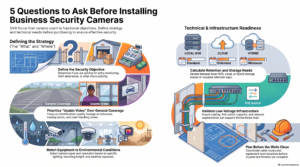
1. What problem are we trying to solve?
Every business has different security concerns. Some need to monitor entrances and exits. Others are focused on theft prevention, loading dock activity, inventory protection, parking areas, or incidents that happen after hours.
Start by identifying what you need the system to help you see, verify, protect, or manage.
For example:
- Do you need to identify everyone entering the building?
- Are you monitoring deliveries and activity at a loading dock?
- Do you need to protect inventory, equipment, or a server room?
- Are you documenting transactions near a register or payment area?
- Do you need to review accidents, property damage, or activity in a parking lot?
Each of these goals may require a different camera, viewing angle, placement, and recording setup.
The design should be based on the needs of the business, not on a standard camera package.
2. Where do we need usable video?
There is an important difference between seeing that something happened and capturing video that helps explain what happened.
A camera may show someone walking through a hallway but still fail to provide a clear view of the person’s face. It may show a vehicle entering a parking lot without capturing the license plate. Technically, the area is covered, but the footage may not be useful.
Decide where you need clear identification and where general activity monitoring is enough.
Areas that often require more detail include:
- Main entrances and reception areas
- Employee and visitor exits
- Loading docks and receiving doors
- Parking lot entrances and driveways
- Cash handling and transaction areas
- Storage rooms and inventory areas
- Server rooms and network closets
A good planning exercise is to review the facility floor plan and mark every entrance, exit, important asset, and possible blind spot. Then define what the camera at each location must capture.
This creates intentional coverage instead of simply placing cameras wherever space is available.
3. What camera and lighting does each area require?
The same camera will not work equally well in every part of a property.
A lobby may need a discreet camera with a wide view. A driveway may require a camera designed for distance and changing outdoor light. A parking lot may need strong nighttime performance, while a receiving area may require a closer view of people, packages, and vehicles.
For each location, consider:
Camera type
Dome and turret cameras are often used indoors or in areas where a compact appearance is preferred. Bullet cameras are more noticeable and can work well for outdoor areas or longer views. Panoramic and movable cameras can serve other specialized needs.
Viewing distance
A wide view can show more of an area, but important details may be lost at a distance. If the goal is to identify a face or vehicle, the camera and lens must be selected for that specific view.
Mounting height and angle
Mounting a camera too high can produce a clear view of the top of someone’s head without showing the person’s face. Placement should match the purpose of the camera, especially at entrances and other identification points.
Lighting
Lighting can change throughout the day. Sunlight through glass, vehicle headlights, deep shadows, and dark outdoor areas can all affect video quality.
A camera that looks excellent during the day may perform very differently at night. Test important views under the same lighting conditions the system will face during normal operation.
4. How long should the footage be stored?
Video retention has a major effect on storage capacity and cost.
If an incident is discovered after the footage has already been deleted, the system cannot help. At the same time, storing months of high resolution video from every camera may add unnecessary expense.
Storage needs depend on several factors:
- Number of cameras
- Video resolution
- Frame rate
- Continuous or motion based recording
- Video compression
- Required retention period
- Local, cloud, or combined storage
Before approving a system, decide:
- How many days of footage should be available?
- Does every camera need the same retention period?
- Where will the video be stored?
- Who should have access to live and recorded video?
- How quickly can an authorized user find and export footage?
- Who is notified if a camera, recorder, hard drive, or network switch fails?
These decisions should be made during the design process, not after the system is installed.
5. Is the cabling and network infrastructure ready?
Modern IP cameras rely on the same type of infrastructure that supports computers, phones, wireless access points, and other connected systems.
That means a surveillance project is also a structured cabling and network project.
The infrastructure review should include:
Cabling and pathways
Each camera needs a reliable pathway back to the appropriate network location. The installation may require indoor, outdoor, riser, or plenum rated cable depending on the building and local requirements.
Power over Ethernet
Most commercial IP cameras receive power through the network cable. The network switches must have enough capacity to support every connected camera and its features.
Network capacity and security
Video can place a significant load on the network. Camera traffic should be planned carefully and separated from other business systems when appropriate. Access to the surveillance network should also be secured.
Rack space and equipment location
Switches, recorders, patch panels, and backup equipment require adequate rack space, ventilation, and electrical power. The equipment should also be organized and clearly labeled for future service.
Backup power
A power outage should not immediately take the entire security system offline. Critical switches, recorders, and related network equipment may need an uninterruptible power supply.
Planning is especially important during new construction, renovations, and office buildouts. Installing cable and pathways before walls and ceilings are closed can prevent delays and costly rework.
Plan the system before purchasing the cameras
A successful commercial surveillance system begins with the facility, its risks, and the way the business operates.
Camera count still matters, but it should be the result of the design process, not the entire design process.
By defining the goal of each camera, identifying where clear video is needed, selecting equipment for the environment, planning storage, and preparing the network infrastructure, your business will be in a much better position to install a system that is reliable, scalable, and useful when an incident occurs.
Planning a security camera project?
Avisight helps businesses plan and install commercial security camera systems, structured cabling, and the supporting network infrastructure. Our team can help with site surveys, system design, installation, documentation, and long term support.
Contact Avisight to discuss a surveillance system designed around the needs of your facility.