

Few things slow down a workday faster than unreliable Wi-Fi.
A video call freezes during an important meeting. A conference room has spotty signal. Employees move around the office trying to find a better connection. Downloads take longer than they should, cloud apps lag, and everyone starts blaming the internet provider.
But in many cases, the internet provider is not the real issue.
Your business may be paying for fast internet service, but that speed still has to be distributed properly throughout the office. If the internal Wi-Fi network is not designed well, your team may still deal with slow speeds, dead zones, dropped calls, and inconsistent performance.
Reliable office Wi-Fi does not happen by accident. It requires proper planning, business-grade hardware, structured cabling, and a clear understanding of how your team actually uses the space.
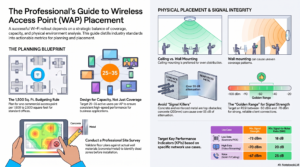
This guide explains the key steps businesses should consider when planning a reliable commercial Wi-Fi network.
1. Understand Capacity vs. Coverage
One of the most common mistakes in office Wi-Fi design is focusing only on coverage.
Coverage answers a basic question:
Can the Wi-Fi signal reach this area?
Capacity answers a more important question:
Can the network support everyone using it at the same time?
For a standard office, a general starting point may be one access point for every 1,500 to 2,500 square feet. However, square footage alone does not tell the full story.
Today, employees often connect multiple devices at once, including:
• Laptops
• Smartphones
• Tablets
• Wireless headsets
• Conference room devices
• Printers and office equipment
That means user density matters just as much as floor space.
A good office Wi-Fi design should account for how many people and devices will be active at the same time. In many office environments, planning around 25 to 35 active users per access point is a more realistic approach.
High-density areas also need extra attention. Conference rooms, training rooms, and collaboration spaces often require dedicated access points because many users gather in one place and rely heavily on video calls, screen sharing, and cloud-based tools.
2. Place Access Points Where People Actually Work
Dead zones are often caused by poor access point placement.
Wi-Fi signals can be weakened by walls, floors, doors, furniture, glass, metal, and other building materials. Drywall may allow signals to pass through more easily, while concrete, brick, block walls, and metal surfaces can create major performance issues.
A common mistake is placing access points in areas that are convenient for installation, such as:
• Hallways
• Utility closets
• Corners
• Storage areas
• Electrical rooms
These locations may be easier to wire, but they often waste signal and create weak spots where employees need reliable connectivity.
For better performance, access points should be placed near the areas where people actually work, meet, and collaborate. This includes open office spaces, conference rooms, training areas, and shared workspaces.
Good access point placement helps reduce dead zones, improve roaming, and create a more consistent Wi-Fi experience throughout the office.
3. Build on a Strong Wired Foundation
Even though users connect wirelessly, office Wi-Fi still depends on wires.
Every access point needs a strong wired connection back to the network. If the cabling behind the scenes is outdated, poorly installed, or not designed for modern bandwidth demands, the wireless experience will suffer.
Structured cabling creates a cleaner, more reliable network foundation. It keeps connections organized, easier to manage, and easier to expand as your business grows.
For many modern office network upgrades, Cat6A cabling is a strong choice because it supports higher speeds and helps prepare businesses for newer wireless standards like Wi-Fi 6 and Wi-Fi 7.
As offices rely more on video conferencing, cloud applications, smart devices, and connected systems, the demand on the network will continue to grow. Investing in the right cabling now can help prevent costly upgrades later.
Reliable Wi-Fi starts with the infrastructure behind the walls, above the ceiling, and inside the network closet.
4. Secure the Network and Support Guest Access
A reliable business Wi-Fi network should also be secure.
Network segmentation helps separate different types of users and devices. For example, employees, guests, phones, printers, cameras, and business systems can each be placed on separate network segments.
This helps protect sensitive company data, reduce unnecessary risk, and keep network traffic better organized.
Guest Wi-Fi is also important for offices that regularly welcome clients, vendors, contractors, or visitors. A dedicated guest network allows visitors to access the internet without connecting to internal business systems.
A captive portal can improve the guest experience even further. This is the branded login page visitors see before connecting to the internet. It can include your company logo, terms of use, password access, or other connection requirements.
With the right guest Wi-Fi setup, visitors get a professional experience while your internal systems stay protected.
5. Start with a Professional Wireless Site Survey
Guessing where to place access points often leads to unreliable Wi-Fi.
A wireless site survey helps remove the guesswork.
During a site survey, your office environment is evaluated to understand:
• Signal strength
• Coverage gaps
• Physical interference
• Building layout challenges
• Access point placement
• Multi-floor roaming issues
• Cabling requirements
• High-density areas
This is especially important for larger offices, multi-floor buildings, older buildings, and spaces with thick walls or heavy conference room usage.
A site survey helps ensure your Wi-Fi network is designed around real conditions instead of assumptions. It can also help prevent common issues like overloaded access points, weak signal areas, and dropped connections between rooms or floors.
Before investing in new hardware, a professional site survey gives your business a clearer plan.
Reliable Office Wi-Fi Starts with the Right Design
Office Wi-Fi is no longer just a convenience. It is part of how work gets done every day.
Your team depends on Wi-Fi for video meetings, cloud software, file sharing, phone systems, collaboration tools, and daily communication. When the network is unreliable, productivity slows down and frustration builds quickly.
A strong commercial Wi-Fi network should be planned around:
• Coverage
• Capacity
• Access point placement
• Structured cabling
• Security
• Guest access
• Future growth
At Avisight, we help businesses design and upgrade office networks with professional site surveys, clean structured cabling, and infrastructure planning built for long-term performance.
If your office is dealing with dropped video calls, dead zones, slow conference room connections, or inconsistent Wi-Fi, it may be time to look beyond your internet provider and evaluate the network inside your building.
Contact Avisight to schedule a professional site survey and infrastructure assessment for your office.